How to Replace Clunky Admin Platforms with Google Chat
Tired of admin tools—clunky ERPs, and rigid CRMs—that waste time and cause “UI Fatigue”? These “shitty admin tools” are a tax on your business velocity. What if the most efficient interface for your entire tech stack wasn’t a new website, but the Google Chat window you already have open?
The Death of the “Admin Dashboard”
I’ve seen a recurring “Wall” in modern operations: employees lose hours navigating browser-based portals that require constant logins and complex dropdowns. This is UI Fatigue, and it’s killing productivity.
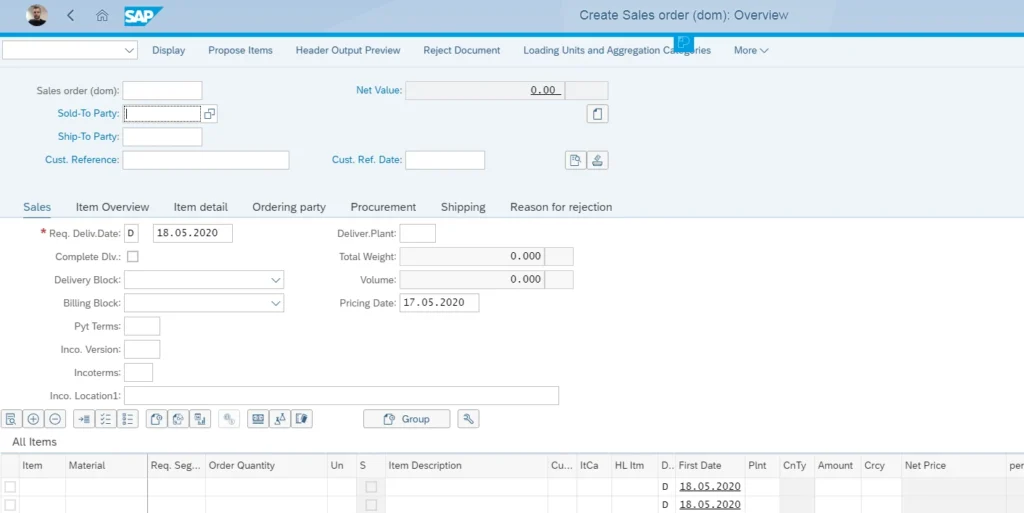
The breakthrough is moving toward a Human-Level Interface. Instead of clicking through a rigid, manual UI, I recommend a world where you simply instruct an agent in plain English.
Under the hood, we leverage Google Workspace Native Security. Because your team is already authenticated within Google, these “conversational actions” are secure by default. I recently worked with a logistics firm where dispatchers now manage fleet updates directly via Google Chat. They’ve completely bypassed their legacy tracking portal, turning a 10-minute navigation nightmare into a 10-second message.
The Harmonizer: Bridging the Software Gap
Most business processes are fragmented. When you update an order in your CRM, you usually have to manually trigger an update in your accounting software or notify the warehouse. These data silos are where human error lives.
I view the AI agent as a Strategic Bridge. Because an agent can interact with multiple APIs simultaneously, it can execute a multi-step task across different platforms from a single command.
- Gemini’s Reasoning Capabilities allow the agent to understand a complex request and break it down into steps.
- API Execution pushes the correct data to Tool A, Tool B, and Tool C in the exact sequence required.
Imagine this: An employee types, “The contract is signed.” Under the hood, the agent automatically updates the CRM, triggers an invoice in the accounting software, and alerts the operations team in a shared Google Space. That is how you harmonize a tech stack.
The Workspace Edge: The Power of Full Integration
This is where the real power of the solution lies. If your business is already subscribed to Google Workspace, Google Chat isn’t just another messenger—it’s the go-to platform that is already fully integrated into your team’s daily workflow.
When you turn your chat into an administration tool, you aren’t working in a vacuum. You are working inside an ecosystem where you can:
- Attach files and images directly from Drive into a workflow with one click.
- Involve colleagues instantly by tagging them into the conversation where the action is happening.
- Leverage a unified system where your emails, documents, and admin tasks finally speak the same language.
This level of integration makes the solution incredibly robust. We aren’t asking employees to learn a new, isolated piece of software; we are unlocking the potential of the tools they use every single day. This level of integration makes the solution incredibly robust and, quite frankly, awesome to use.
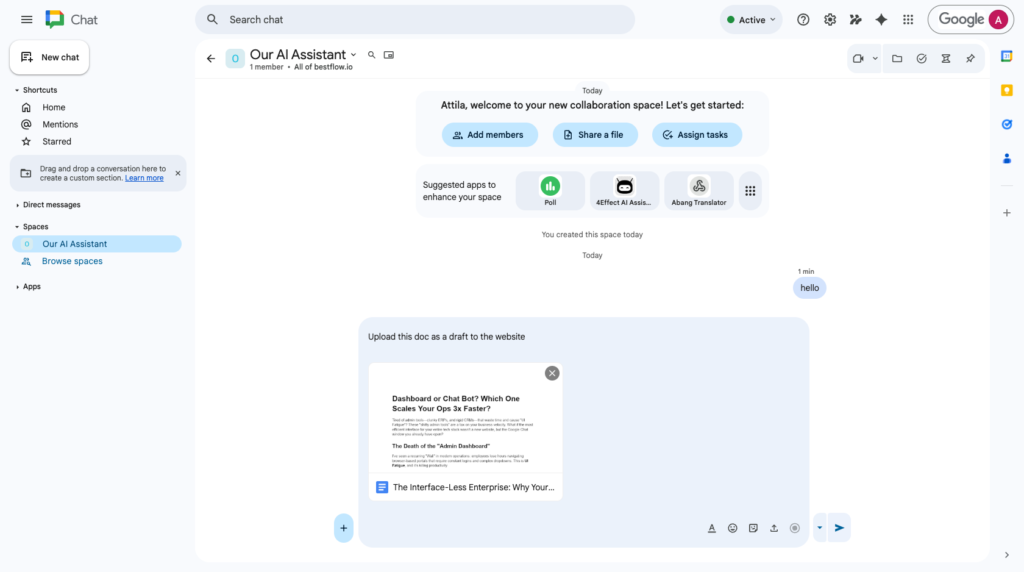
Under the Hood: A Simple Architecture for Complex Tasks
My aim here isn’t to provide a full tutorial, but rather to pop up the idea of how simple the technical implementation actually is. Under the hood, I typically build these systems using three core pillars:
- Google Chat as the Frontend: We stop building custom web pages and let Chat handle the user interaction.
- The Brain (Custom AI Agent): I build a specialized agent using Google’s Agent Development Kit (ADK). This is my preferred way to define agentic behavior, as it allows for precise control over how the agent reasons and acts. To make this scalable, I leverage MCP (Model Context Protocol) server solutions hosted on Cloud Run. This allows the agent to communicate with external data and tools in a secure, standardized way.
- The Bridge (Cloud Run Script): A lightweight script, also hosted on Cloud Run, acts as the connector between the Chat interface and the AI agent.
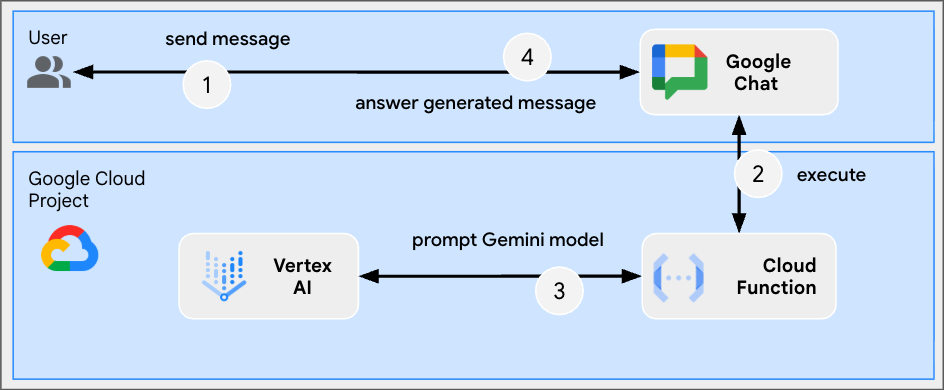
Because the entire stack is built within the Google Cloud and Workspace environment, the permission and access management are already enterprise-grade. You aren’t “hacking” together a solution; you are building on a secure, professional foundation that is already fully integrated into your business office suite.
The Economic Edge of “Zero UI”
Building and maintaining custom web interfaces for internal tools is incredibly expensive. Every time your process changes, your UI code has to change with it.
When you make Google Chat your interface, you effectively delete the development cost of the UI. You only need to build the “logic”—the agent’s brain—not the “skin.”
To keep things clean, I use Interactive Cards in Google Chat. These allow the agent to present specific buttons or data summaries only when they are needed. It’s a “clean” experience that adapts to the task at hand. I’ve seen SMBs scale their operations 3x faster because new hires don’t need “software training.” They just need to know how to send a chat message to the company agent.
A Pragmatic Path Forward: Evolution, Not Revolution
I often hear the concern: “Won’t we lose control if we move everything into a chat window?” It’s a fair question, but I don’t suggest a “big bang” migration. My personal recommendation is to start by testing this approach on low-stakes, high-frequency tasks. Focus on the “simple to middle-complex” actions—the ones that aren’t mission-critical—and make those available via the chat agent.
I suggest moving in this direction gradually, based on real data and your team’s experience. You don’t have to delete your traditional UI today. Keep your critical, high-risk tasks on traditional dashboards for now, while offloading the “death by a thousand clicks” tasks to Google Chat.
Even by shifting just the small, transactional burdens, you will see a significant increase in productivity. Perhaps more importantly, you make your employees’ lives easier and more comfortable. When you remove the friction of shitty admin tools, you allow your team to focus on the work that actually moves the needle.

About the Author
Attila
I am a Senior Data Analyst and Automation Specialist with 15+ years of experience building practical solutions on Google Workspace to supercharge your productivity. Let me transform your raw data into a decisive competitive advantage and automate your workflows, all within the platform your team already knows.