How to Build a Professional AI Chatbot That Runs Custom Code & Saves Data to Google Sheets
Get rid of subscriptions and limitations, build your own enterprise level AI chatbot without compromise. This tutorial will guide you through deploying a truly enterprise-grade, scalable virtual agent leveraging the power of Google Cloud Platform (GCP) and Conversation Agents (formerly known as Dialogflow CX).
- What Makes an AI Chatbot "Enterprise-Level"?
- What is Conversational Agents (Dialogflow CX)?
- For Whom is Conversational Agents Suitable?
- Explaining Our Case Study: The Personal Loan Bot
- What You'll Need: Prerequisites
- Navigating the Tutorial
- Tool Source Code
- The Playbook Source Code
- Parameters and their descriptions
For a realistic scenario, we will use the publicly available product details of the Santander Bank Personal Loan to train our bot. Throughout this guide, I will walk you through building a high-performance solution that integrates complex
- knowledge base Q&A,
- a real-time loan calculations,
- and secure lead capture into a Google Sheet,
demonstrating that you can achieve top-tier, enterprise quality without the unnecessary cost.
What Makes an AI Chatbot “Enterprise-Level”?
When we talk about an “enterprise-level” virtual agent, we are describing more than just a chatbot that handles basic FAQs or chitchat. We are talking about a mission-critical, high-performance system designed to perform valuable business actions (e.g., capture leads, offer products, process transactions, reset passwords), integrate deeply into a company’s operations, and scale without limits.
The key features that elevate a conversational AI solution to enterprise grade include:
- Robust Conversational Control (conversational Agents): This bot must handle non-linear conversations, managing complex context and allowing users to jump between topics without confusion.
- Deep System Integration & Business Task Orientation: Enterprise solutions are task-oriented, performing valuable business actions instead of simply having a conversation. The agent acts as a digital worker, performing functions like calculating data, updating systems, and collecting customer leads for your sales team.
- Scalability and Reliability: The solution must handle thousands of concurrent users seamlessly during peak demand.
- Knowledge Base Grounding and Accuracy: Answers must be accurate and grounded in approved company documentation to prevent “hallucinations.”
- Seamless Human Handoff: The bot knows its limitations and can gracefully transition complex queries to a live agent. It must pass along the full conversation context and customer data for efficient resolution.
What is Conversational Agents (Dialogflow CX)?
Conversational Agents is a powerful, enterprise-grade platform offered by Google Cloud Platform (GCP) for building sophisticated, scalable virtual agents (AI Chatbots). It is specifically designed to manage mission-critical, high-performance conversational systems.
The key aspects of Dialogflow CX, as highlighted in the context of building an enterprise-level virtual agent, include:
- Robust Conversational Control: It enables the creation of bots that can handle non-linear conversations, seamlessly manage complex context, and allow users to jump between topics without getting confused.
- Task Orientation: Agents built with Dialogflow CX are inherently task-oriented, meaning they are designed to perform valuable business actions, rather than just handling simple chitchat.
- Scalability: The platform is engineered to be highly scalable and reliable, ensuring the solution can handle thousands of concurrent users during peak demand.
For Whom is Conversational Agents Suitable?
So, who is this powerful platform actually for?
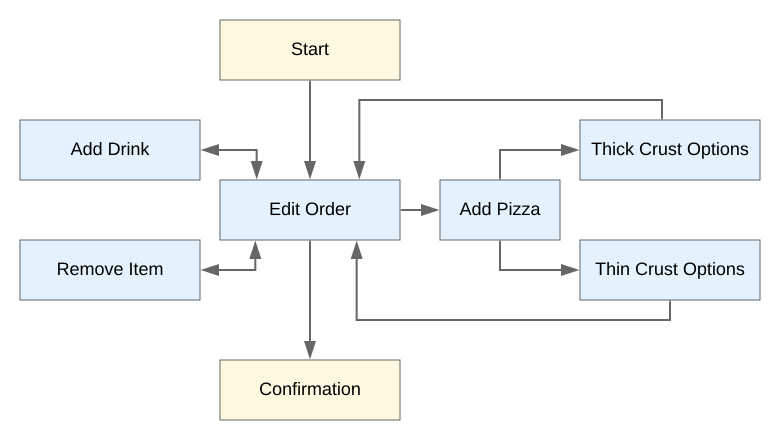
When you first open the Dialogflow CX console, you’ll see a clean, visual interface based on flowcharts (much like the pizza order example I shared earlier) . It’s tempting to think this is a simple, no-code, drag-and-drop tool.
However, I want to be upfront with you: Conversational Agents is a deeply powerful and complex enterprise-grade tool, and its simple visual surface can be deceptive .
This is not a platform you can master simply by clicking here and there in an intuitive way . Building a truly robust, scalable, and task-oriented chatbot like the one we’re about to create requires more than just navigating a visual builder. It requires you to:
- Analyze and design complex conversational flows.
- Read documentation thoroughly to understand the “why” behind the settings .
- Consult other resources and tutorials (like this one!) to see practical applications .
- Have some sense for development . To perform real business actions, like our loan calculation or lead capture, you will need to understand how to connect to other systems. This means getting comfortable with concepts like webhooks, APIs, and data formats (like JSON).
I am writing this tutorial specifically to make this journey much easier for you . My goal is to guide you step-by-step through a real-world project, explaining these complex pieces in a way that makes sense.
But it definitely requires a learning path . Don’t be discouraged by this! The payoff is gaining the skill to build truly sophisticated agents without the limitations or subscription fees of other platforms.
As you follow along, if you get stuck, have a question, or want clarification on a specific step, please post a comment below!
Explaining Our Case Study: The Personal Loan Bot
To move from theory to practice, we need a realistic project. Simply talking about features isn’t enough; we need to build them.
For this tutorial, we will build a virtual agent for a common, high-value business scenario: a personal loan assistant.
To keep this grounded in the real world, we will use the publicly available product details for the Santander Bank Personal Loan as our foundation. This allows us to work with a concrete, enterprise-level use case.
Our goal is to build a bot that does far more than just answer simple questions. We will construct a complete, task-oriented agent that performs valuable business functions. Here are the core modules we will build together:
- Knowledge Base Q&A: First, we’ll train the bot to answer common questions accurately using Santander’s product information.
- Real-Time Loan Calculations: This is where we get into deep system integration. We will build a custom action that allows the bot to perform real-time loan calculations for the user. This is a perfect example of a valuable, task-oriented function.
- Secure Lead Capture: Finally, after providing value, our bot will capture the user’s details as a qualified lead. We will implement a secure process to send this information directly into a Google Sheet, demonstrating a complete, end-to-end business process.
By building these three modules, you will learn how to handle knowledge, perform custom actions, and integrate with external systems—the three pillars of an enterprise-level chatbot.
What You’ll Need: Prerequisites
Before we start building, let’s get the logistics out of the way. Don’t worry, this part is straightforward, and you can follow along with a free account.
Here are the two things you’ll need:
- A Google Account: Any standard Google (or Gmail) account will work. If you don’t have one, you can create one for free.
- A Google Cloud Platform (GCP) Project with Billing Enabled: This is the most important step, and one that sometimes makes people nervous. I want to assure you, you don’t need to worry about costs.
Let me be very clear: Following this tutorial should not cost you anything.
While you do need to set up a billing account and link a credit card, this is standard practice for Google to verify your identity and prevent abuse. You will not be charged automatically because when you first sign up for Google Cloud, you are eligible for a $300 free credit to use over 90 days.
Here is a video how to create a billing account in GCP: Creating a billing account
Navigating the Tutorial
Since this is an extensive enterprise-level build, I’ve designed this post to be your conceptual and technical anchor. While I won’t list every single mouse click—you can follow the exact, step-by-step visual process in the embedded YouTube video above—the following sections will detail the architecture of what we are building and the core concepts you need to master.
What are Conversational Agents?
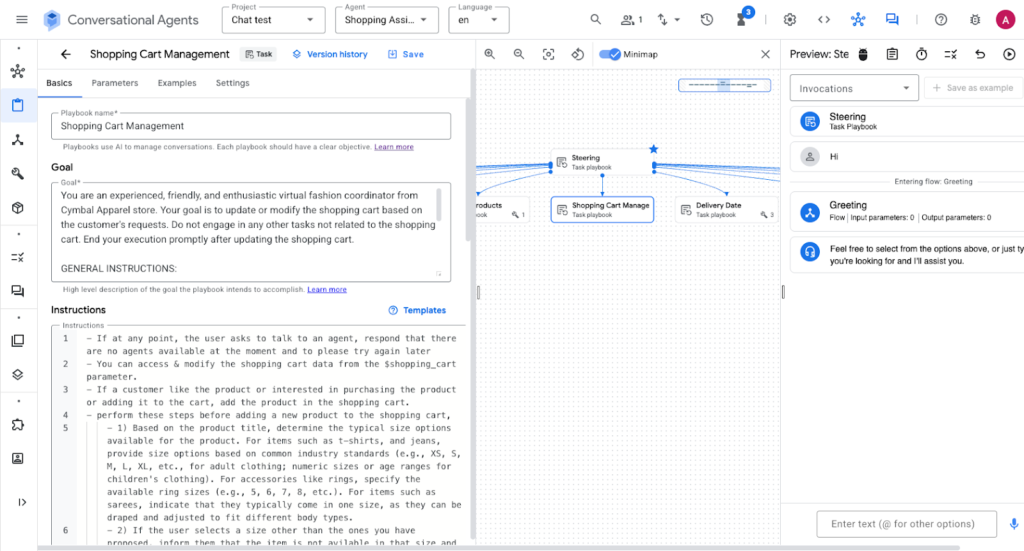
Formerly known as Dialogflow CX, Conversational Agents is Google’s premier platform for building AI that doesn’t just “chat,” but “does.” It’s found within the Google Cloud Console. Unlike basic chatbots, these agents use a “state-machine” approach (Flows and Pages) combined with modern LLM capabilities (Playbooks) to handle complex, multi-turn business logic.
Getting Started
To begin, you’ll navigate to the Conversational Agents console, select your GCP project, and create a new agent. The “entry point” of your bot is the Default Start Flow. This is where the initial greeting happens and where the agent decides which “Playbook” to trigger based on the user’s request.
Understanding Playbooks
Playbooks are the “Generative” heart of modern agents. Instead of hard-coding every possible response, you give the agent a Goal (e.g., “Help the user calculate a loan”) and Instructions (e.g., “1. Ask for amount, 2. Ask for term, 3. Call the calculator tool”).
- Playbook Parameters: These are variables the agent “remembers” during the session (like $amount or $user_name). They act as the agent’s short-term memory.
The Power of Examples (Few-Shot Prompting)
This is arguably the most critical part of the setup. Examples are where you provide “gold-standard” sample conversations to the agent.
By adding Examples, you show the LLM:
- User Input: How a real human might ask for help.
- Agent Action: When exactly the agent should decide to call a tool (like the calculator).
- Tool Call/Output: How the agent should interpret the technical data coming back from your Python code and translate it into a friendly response.
Without examples, the agent has to guess; with them, it follows your specific business tone and logic perfectly.
Expanding Capabilities with Tools
Tools are what give your agent “hands.” We will be building three distinct types:
- Advanced Tools via Google Cloud Run: For complex logic like our Loan Calculator, we host a Python script on Cloud Run. The agent sends the user’s data to this tool, the script does the math, and returns the result.
- FAQ Knowledgebase: We will create a “Data Store” tool. You simply upload the Santander Bank PDF, and the agent uses it to answer any specific product questions without you having to write a single “intent.”
- Google Sheets Integration: This is our “Lead Capture” tool. When a user provides their contact info, the agent calls a Python webhook that appends a new row to your Google Sheet in real-time.
Testing and Deployment
Before going live, we use the Simulator within the console to “talk” to the bot and inspect the execution traces. Once satisfied, you can deploy the bot to your website using the Dialogflow Messenger integration—a simple snippet of code you paste into your HTML.
Tool Source Code
Below is the source code for the custom tools we deploy in this tutorial. These are designed to be hosted on Google Cloud Run or as Cloud Functions.
Tool 1: The Loan Calculator
This tool receives the loan amount and term, then returns the estimated monthly payment.
requirements.txt
functions-framework==3.*
Flask
Function entry point: calculate_loan
Open API Schema
Tool 2: Google Sheets Lead Capture
This tool takes the user’s name, email, and loan interest, then saves it directly to a specific spreadsheet.
requirements.txt
functions-framework==3.*
google-api-python-client
google-auth
flask
Function entry point: write_loan_data
Open API Schema
The Playbook Source Code
Below is the source code for the Playbooks we use in this tutorial.
Default Playbook
Loan Calculation
Sending Lead
Parameters and their descriptions
- loan_amont
Loan amount that customer is going borrow - loan_term
Loan repayment period preferred by customer to repay the borrowed loan - monthly_payment
Calculated monthly payment amount - total_repayable
Calculated total repayable loan amount - apr
APR percentage

About the Author
Attila
I am a Senior Data Analyst and Automation Specialist with 15+ years of experience building practical solutions on Google Workspace to supercharge your productivity. Let me transform your raw data into a decisive competitive advantage and automate your workflows, all within the platform your team already knows.